最近写了unictf的两道unity逆向题,借此机会学习一下unity
unity简介 Unity是一种跨平台的游戏开发引擎,主要由C#编写,用来做游戏和交互式应用的一整套开发引擎 + 编辑器,包括程序、美术、音效、物理、动画、打包。与Unreal Engine(虚幻引擎)并称双雄。《原神》、《王者荣耀》、《金铲铲之战》、《纪念碑谷》等手游都是unity开发的。
Unity 跨平台 = 写一套游戏逻辑,Unity 能生成能在不同设备上跑的程序
如何实现跨平台:mono和IL2CPP
Mono
Mono是一个让 C# 程序在不同平台上运行的运行时虚拟机,类似 Java 的 JVM,Unity 早期用它来跑 C# 脚本, C# 编译成 IL → 和 Mono 运行时一起打包 → 运行时 JIT 执行
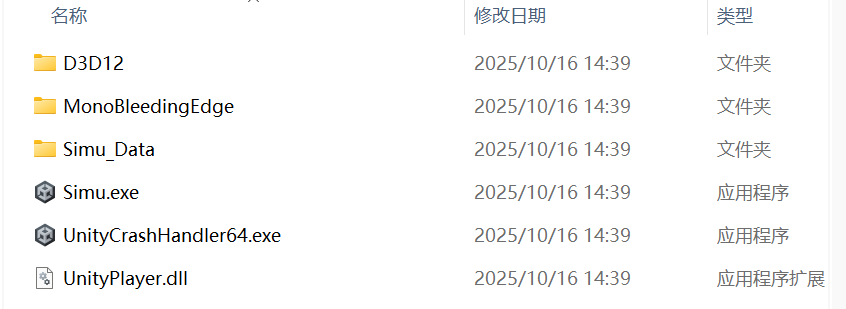
以Geekgame 2025 团结引擎这道题为例,它是用mono打包的,区分两种方式只需要进入名称_Data文件夹看
tree /f
1
2
3
4
5
6
7
8
9
10
11
12
13
14
15
16
17
18
19
20
21
22
23
24
25
26
27
28
29
30
31
32
33
34
35
36
37
38
39
40
41
42
43
44
45
46
47
48
49
50
51
52
53
54
55
56
57
58
59
60
61
62
63
64
65
66
67
68
69
70
71
72
73
74
75
76
77
78
79
80
81
82
83
84
85
86
87
88
89
90
91
92
93
94
95
96
97
98
99
100
101
102
103
104
105
106
107
108
109
110
111
112
113
114
115
116
117
118
119
120
121
122
123
124
125
126
127
128
129
130
131
132
133
134
135
136
137
138
139
140
141
142
143
144
145
146
147
148
149
150
151
152
153
154
155
156
157
158
159
160
161
162
163
164
165
166
167
168
169
170
171
172
173
174
175
176
177
178
179
180
181
182
183
184
185
186
187
188
189
190
191
192
193
194
195
196
197
198
199
200
201
202
203
204
205
D:. │ Simu.exe │ UnityCrashHandler64.exe │ UnityPlayer.dll │ ├─D3D12 │ D3D12Core.dll │ ├─MonoBleedingEdge │ ├─EmbedRuntime │ │ mono-2.0-bdwgc.dll │ │ MonoPosixHelper.dll │ │ │ └─etc │ └─mono │ │ browscap.ini │ │ config │ │ │ ├─2.0 │ │ │ DefaultWsdlHelpGenerator.aspx │ │ │ machine.config │ │ │ settings.map │ │ │ web.config │ │ │ │ │ └─Browsers │ │ Compat.browser │ │ │ ├─4.0 │ │ │ DefaultWsdlHelpGenerator.aspx │ │ │ machine.config │ │ │ settings.map │ │ │ web.config │ │ │ │ │ └─Browsers │ │ Compat.browser │ │ │ ├─4.5 │ │ │ DefaultWsdlHelpGenerator.aspx │ │ │ machine.config │ │ │ settings.map │ │ │ web.config │ │ │ │ │ └─Browsers │ │ Compat.browser │ │ │ └─mconfig │ config.xml │ └─Simu_Data │ app.info │ boot.config │ globalgamemanagers │ globalgamemanagers.assets │ globalgamemanagers.assets.resS │ level0 │ resources.assets │ resources.assets.resS │ RuntimeInitializeOnLoads.json │ ScriptingAssemblies.json │ sharedassets0.assets │ sharedassets0.assets.resS │ sharedassets0.resource │ ├─Managed │ Assembly-CSharp.dll │ Mono.Security.dll │ mscorlib.dll │ netstandard.dll │ System.ComponentModel.Composition.dll │ System.Configuration.dll │ System.Core.dll │ System.Data.DataSetExtensions.dll │ System.Data.dll │ System.dll │ System.Drawing.dll │ System.EnterpriseServices.dll │ System.IO.Compression.dll │ System.IO.Compression.FileSystem.dll │ System.IO.Hashing.dll │ System.Memory.dll │ System.Net.Http.dll │ System.Numerics.dll │ System.Runtime.CompilerServices.Unsafe.dll │ System.Runtime.dll │ System.Runtime.Serialization.dll │ System.Security.dll │ System.ServiceModel.Internals.dll │ System.Transactions.dll │ System.Xml.dll │ System.Xml.Linq.dll │ Unity.AI.Navigation.dll │ Unity.Burst.dll │ Unity.Burst.Unsafe.dll │ Unity.Cinemachine.dll │ Unity.Collections.dll │ Unity.Collections.LowLevel.ILSupport.dll │ Unity.InputSystem.dll │ Unity.InputSystem.ForUI.dll │ Unity.Mathematics.dll │ Unity.Multiplayer.Center.Common.dll │ Unity.Rendering.LightTransport.Runtime.dll │ Unity.RenderPipeline.Universal.ShaderLibrary.dll │ Unity.RenderPipelines.Core.Runtime.dll │ Unity.RenderPipelines.Core.Runtime.Shared.dll │ Unity.RenderPipelines.Core.ShaderLibrary.dll │ Unity.RenderPipelines.GPUDriven.Runtime.dll │ Unity.RenderPipelines.ShaderGraph.ShaderGraphLibrary.dll │ Unity.RenderPipelines.Universal.2D.Runtime.dll │ Unity.RenderPipelines.Universal.Config.Runtime.dll │ Unity.RenderPipelines.Universal.Runtime.dll │ Unity.RenderPipelines.Universal.Shaders.dll │ Unity.Splines.dll │ Unity.StarterAssets.dll │ Unity.TextMeshPro.dll │ Unity.Timeline.dll │ Unity.VisualScripting.Antlr3.Runtime.dll │ Unity.VisualScripting.Core.dll │ Unity.VisualScripting.Flow.dll │ Unity.VisualScripting.State.dll │ UnityEngine.AccessibilityModule.dll │ UnityEngine.AIModule.dll │ UnityEngine.AMDModule.dll │ UnityEngine.AndroidJNIModule.dll │ UnityEngine.AnimationModule.dll │ UnityEngine.ARModule.dll │ UnityEngine.AssetBundleModule.dll │ UnityEngine.AudioModule.dll │ UnityEngine.ClothModule.dll │ UnityEngine.ClusterInputModule.dll │ UnityEngine.ClusterRendererModule.dll │ UnityEngine.ContentLoadModule.dll │ UnityEngine.CoreModule.dll │ UnityEngine.CrashReportingModule.dll │ UnityEngine.DirectorModule.dll │ UnityEngine.dll │ UnityEngine.DSPGraphModule.dll │ UnityEngine.GameCenterModule.dll │ UnityEngine.GIModule.dll │ UnityEngine.GraphicsStateCollectionSerializerModule.dll │ UnityEngine.GridModule.dll │ UnityEngine.HierarchyCoreModule.dll │ UnityEngine.HotReloadModule.dll │ UnityEngine.IdentifiersModule.dll │ UnityEngine.ImageConversionModule.dll │ UnityEngine.IMGUIModule.dll │ UnityEngine.InputForUIModule.dll │ UnityEngine.InputLegacyModule.dll │ UnityEngine.InputModule.dll │ UnityEngine.InsightsModule.dll │ UnityEngine.JSONSerializeModule.dll │ UnityEngine.LocalizationModule.dll │ UnityEngine.MarshallingModule.dll │ UnityEngine.MultiplayerModule.dll │ UnityEngine.NVIDIAModule.dll │ UnityEngine.ParticleSystemModule.dll │ UnityEngine.PerformanceReportingModule.dll │ UnityEngine.Physics2DModule.dll │ UnityEngine.PhysicsModule.dll │ UnityEngine.PropertiesModule.dll │ UnityEngine.RuntimeInitializeOnLoadManagerInitializerModule.dll │ UnityEngine.ScreenCaptureModule.dll │ UnityEngine.ShaderVariantAnalyticsModule.dll │ UnityEngine.SharedInternalsModule.dll │ UnityEngine.SpriteMaskModule.dll │ UnityEngine.SpriteShapeModule.dll │ UnityEngine.StreamingModule.dll │ UnityEngine.SubstanceModule.dll │ UnityEngine.SubsystemsModule.dll │ UnityEngine.TerrainModule.dll │ UnityEngine.TerrainPhysicsModule.dll │ UnityEngine.TextCoreFontEngineModule.dll │ UnityEngine.TextCoreTextEngineModule.dll │ UnityEngine.TextRenderingModule.dll │ UnityEngine.TilemapModule.dll │ UnityEngine.TLSModule.dll │ UnityEngine.UI.dll │ UnityEngine.UIElementsModule.dll │ UnityEngine.UIModule.dll │ UnityEngine.UmbraModule.dll │ UnityEngine.UnityAnalyticsCommonModule.dll │ UnityEngine.UnityAnalyticsModule.dll │ UnityEngine.UnityConnectModule.dll │ UnityEngine.UnityConsentModule.dll │ UnityEngine.UnityCurlModule.dll │ UnityEngine.UnityTestProtocolModule.dll │ UnityEngine.UnityWebRequestAssetBundleModule.dll │ UnityEngine.UnityWebRequestAudioModule.dll │ UnityEngine.UnityWebRequestModule.dll │ UnityEngine.UnityWebRequestTextureModule.dll │ UnityEngine.UnityWebRequestWWWModule.dll │ UnityEngine.VehiclesModule.dll │ UnityEngine.VFXModule.dll │ UnityEngine.VideoModule.dll │ UnityEngine.VirtualTexturingModule.dll │ UnityEngine.VRModule.dll │ UnityEngine.WindModule.dll │ UnityEngine.XRModule.dll │ ├─Plugins │ └─x86_64 │ lib_burst_generated.dll │ └─Resources unity default resources unity_builtin_extra
根目录的Simu.exe是程序入口,初始化 Unity 引擎,加载 UnityPlayer.dll,指定 Simu_Data 目录,没有游戏逻辑,逆向不需要它
UnityPlayer.dll(Unity 核心运行时)作用是Unity 引擎的 native 层管理渲染、物理、音频,初始化 Mono VM,没有游戏逻辑
UnityCrashHandler64.exe作用是崩溃上报
MonoBleedingEdge目录下是mono虚拟机本体,静态反编译不需要
Simu_Data是游戏本体,包含游戏逻辑:
globalgamemanagers level0 resources.assets sharedassets0.assets *.resS是unity资源和引擎数据,可以用assertStudio查看
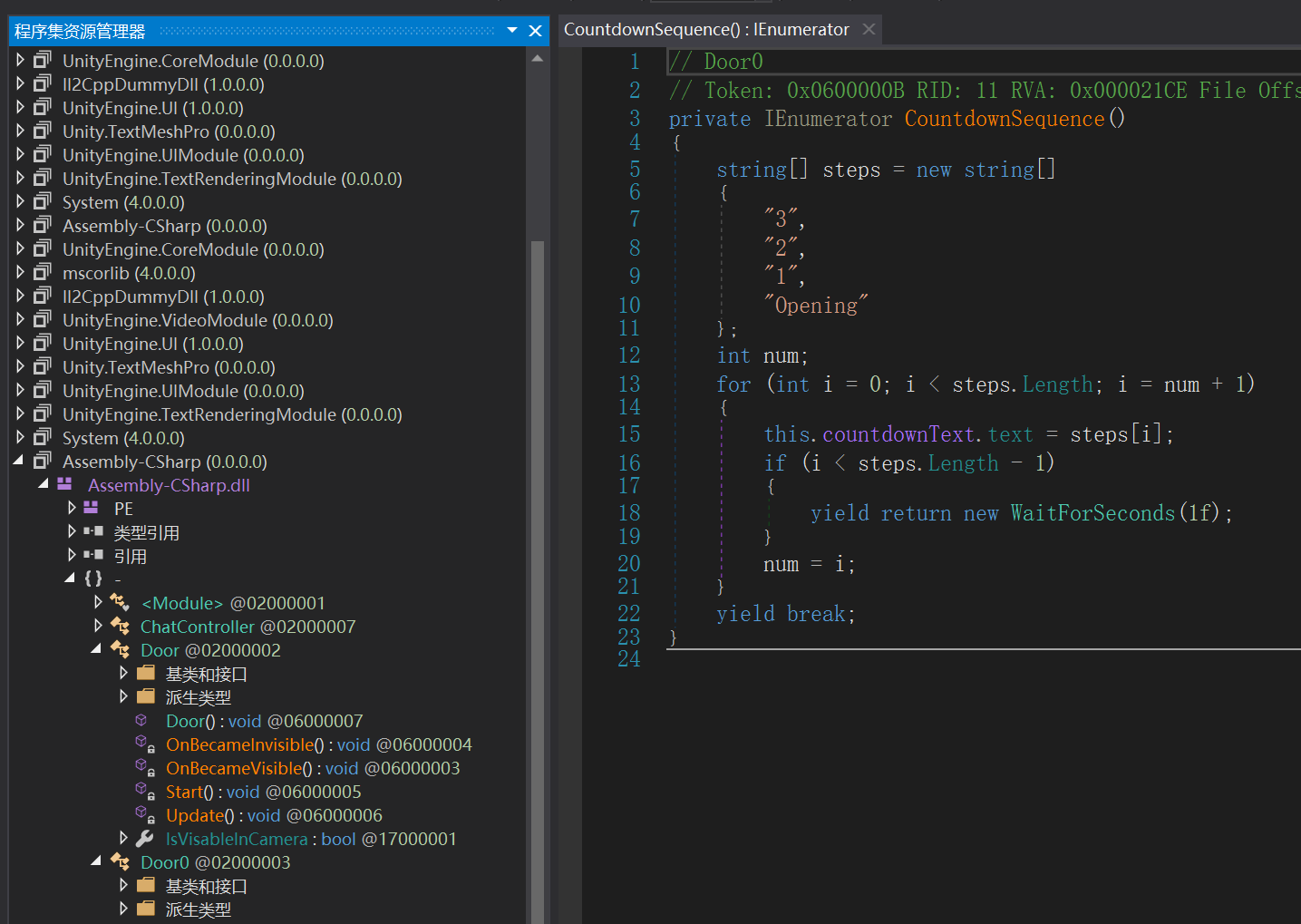
🌟Managed/下是核心,Assembly-CSharp.dll拖进dnSpy可以看到开发者写的全部C#游戏逻辑
UnityEngine*.dll是Unity API定义, System*.dll / mscorlib.dll / netstandard.dll是.NET / Mono 标准库,其他是第三方 / Unity Package DLL,Plugins/x86_64/lib_burst_generated.dll是高性能 native 编译
反编译
IL2CPP
IL2CPP是 Unity 把 C# 的 IL 转成 C++,再编译成本地二进制的技术。il2cpp.exe 是由C#编写的受托管的可执行程序,它接受我们在Unity中通过Mono编译器生成的托管程序集,并生成指定平台下的C++代码。一旦将Unity应用中的代码转换为C++代码,就可以在移动平台上执行。
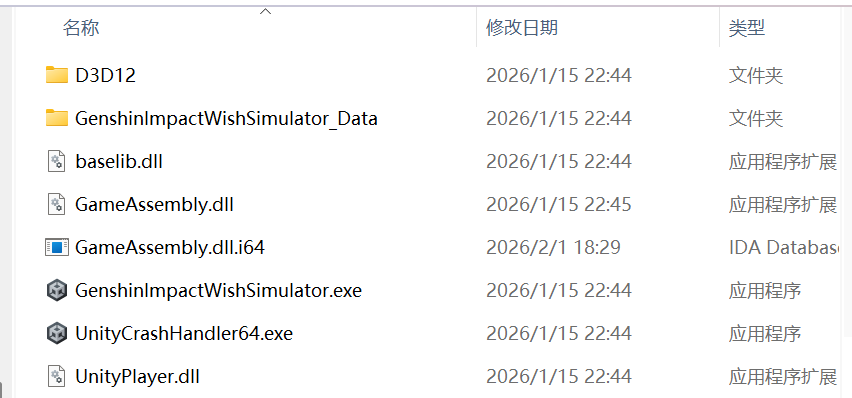
以unictf 原神启动这道题为例,它是IL2CPP打包的
tree /f
1
2
3
4
5
6
7
8
9
10
11
12
13
14
15
16
17
18
19
20
21
22
23
24
25
26
27
28
29
30
31
32
33
34
35
36
37
38
39
40
41
42
43
44
45
D:. │ baselib.dll │ GameAssembly.dll │ GenshinImpactWishSimulator.exe │ UnityCrashHandler64.exe │ UnityPlayer.dll │ ├─D3D12 │ D3D12Core.dll │ └─GenshinImpactWishSimulator_Data │ app.info │ boot.config │ globalgamemanagers │ globalgamemanagers.assets │ globalgamemanagers.assets.resS │ level0 │ resources.assets │ resources.assets.resS │ RuntimeInitializeOnLoads.json │ ScriptingAssemblies.json │ sharedassets0.assets │ sharedassets0.assets.resS │ sharedassets0.resource │ ├─il2cpp_data │ ├─Metadata │ │ global-metadata.dat │ │ │ └─Resources │ mscorlib.dll-resources.dat │ Newtonsoft.Json.dll-resources.dat │ System.Data.dll-resources.dat │ System.Drawing.dll-resources.dat │ ├─Plugins │ └─x86_64 │ lib_burst_generated.dll │ ├─Resources │ unity default resources │ unity_builtin_extra │ └─StreamingAssets UnityServicesProjectConfiguration.json
GenshinImpactWishSimulator.exe是程序入口,启动 Unity 引擎,加载 UnityPlayer.dll指定 _Data目录,不包含游戏逻辑
UnityPlayer.dll是Unity 引擎核心 native 层
🌟GameAssembly.dll是所有 C# 代码经 IL2CPP 转换后的 native 实现
baselib.dll是Unity 的跨平台底层封装
GenshinImpactWishSimulator_Data是真正的数据区。
globalgamemanagers level0 resources.assets sharedassets0.assets *.resS是unity资源,用assertStudio查看
🌟il2cpp_data/Metadata/global-metadata.dat 非常重要,是IL2CPP 的元数据表,包含:类名,方法名,字段名,字符串,类型关系,命名空间,用来还原 C# 类结构,给 GameAssembly.dll打符号
逆向方法 PC端 对于Mono打包的程序,直接把Assembly-CSharp.dll拖进dnSpy即可得到C#代码进行后续分析
对于IL2CPP打包的程序,使用IL2cppDumper工具恢复出游戏逻辑
判断GameAssembly.dll和global-metadata.dat是否加密,查看文件头,GameAssembly.dll是正常的elf文件 7F 45 4C 46,global-metadata.dat是正常的魔术头AF 1B B1 FA
1 Il2CppDumper.exe GameAssembly.dll global-metadata.dat
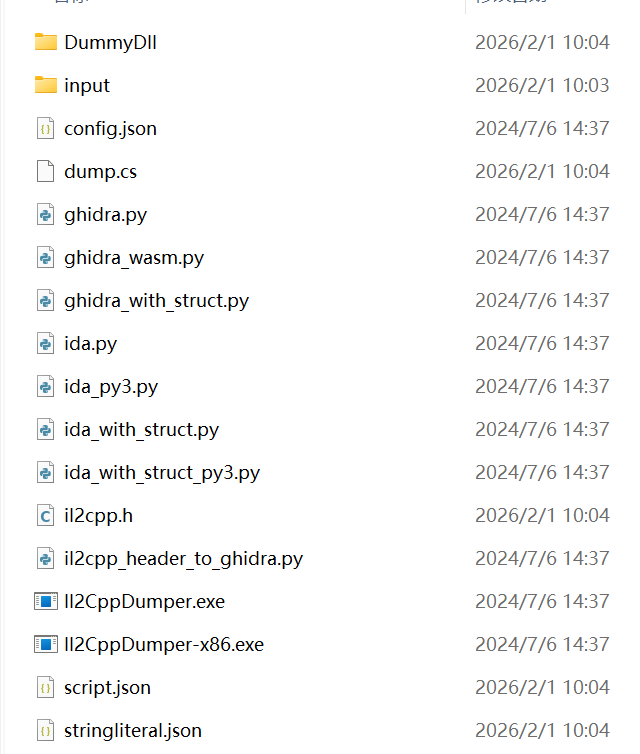
生成了以下文件
Dumpall文件夹下生成了以下文件
1
2
3
4
5
6
7
8
9
10
11
12
13
14
15
16
17
18
19
20
21
22
23
24
25
26
27
28
29
30
31
32
33
34
35
36
37
38
39
40
41
42
43
44
45
46
47
48
49
50
51
52
53
54
55
56
57
58
59
60
Assembly-CSharp.dll Il2CppDummyDll.dll Mono.Security.dll mscorlib.dll System.Configuration.dll System.Core.dll System.dll System.Xml.dll Unity.AdaptivePerformance.dll Unity.AdaptivePerformance.Google.Android.dll Unity.Burst.dll Unity.Burst.Unsafe.dll Unity.Collections.dll Unity.Collections.LowLevel.ILSupport.dll Unity.InputSystem.dll Unity.InputSystem.ForUI.dll Unity.Mathematics.dll Unity.Profiling.Core.dll Unity.RenderPipeline.Universal.ShaderLibrary.dll Unity.RenderPipelines.Core.Runtime.dll Unity.RenderPipelines.Core.Runtime.Shared.dll Unity.RenderPipelines.GPUDriven.Runtime.dll Unity.RenderPipelines.Universal.Runtime.dll Unity.TextMeshPro.dll Unity.VisualScripting.Antlr3.Runtime.dll Unity.VisualScripting.Core.dll Unity.VisualScripting.Flow.dll UnityEngine.AIModule.dll UnityEngine.AndroidJNIModule.dll UnityEngine.AnimationModule.dll UnityEngine.AudioModule.dll UnityEngine.CoreModule.dll UnityEngine.dll UnityEngine.GridModule.dll UnityEngine.HierarchyCoreModule.dll UnityEngine.IMGUIModule.dll UnityEngine.InputForUIModule.dll UnityEngine.InputLegacyModule.dll UnityEngine.InputModule.dll UnityEngine.JSONSerializeModule.dll UnityEngine.ParticleSystemModule.dll UnityEngine.Physics2DModule.dll UnityEngine.PhysicsModule.dll UnityEngine.PropertiesModule.dll UnityEngine.SharedInternalsModule.dll UnityEngine.SpriteShapeModule.dll UnityEngine.SubsystemsModule.dll UnityEngine.TerrainModule.dll UnityEngine.TextCoreFontEngineModule.dll UnityEngine.TextCoreTextEngineModule.dll UnityEngine.TextRenderingModule.dll UnityEngine.TilemapModule.dll UnityEngine.UI.dll UnityEngine.UIElementsModule.dll UnityEngine.UIModule.dll UnityEngine.UnityAnalyticsCommonModule.dll UnityEngine.VFXModule.dll UnityEngine.VRModule.dll UnityEngine.XRModule.dll __Generated
将Assembly-CSharp.dll放在dnSpy分析,就是dump.cs,这个文件把C#的dll代码的类、方法、字段列出来
il2cpp.h是生成的cpp的头文件,从头文件里可以看到相关的数据结构
script.json以json格式显示类的方法信息
stringliteral.json以json的格式显示所有的字符串信息
将GameAssembly.dll放进ida进行分析,打开ida file → script file依次导入dump出来的ida_py3.py → 再导入scripts.json, 再导入 ida_py3.py → stringliteral.json 等待恢复符号表完成
接下来用ida_with_struct_py3.py脚本,依此点击scripts,json和il2cpp.h
进行后续分析
IL2cppDumper原理:
在Unity安装目录的Editor目录中找到il2cpp虚拟机的源码vm目录,在里面的GlobalMetadata.cpp中,就可以看到加载global-metadata.dat文件的逻辑。如果开发者对global-metadata.dat文件做了加密,那么在GlobalMetadata.cpp中加载global-metadata.dat前需要实现对应的解密逻辑。
IL2CppDumper正是利用global-metadata.dat文件进行逆向的。global-metadata.dat文件是一个二进制文件,是按照一定的数据结构进行写入的。将global-metadata.dat拖进010editor,点击菜单Templates / Open Template,选择刚刚下载的UnityMetadata.bt解析文件。global-metadata.dat是看不出具体的字符串的,需要依赖libil2cpp.so进行寻址
分析:什么?IL2CPP APP分析这一篇就够啦!-安全KER - 安全资讯平台
MelonLoader + UnityExplorer 这两个工具可以在游戏运行时改变游戏逻辑
运行MelonLoader.Installer.exe选择游戏目录
MelonLoader插件加载器是同时支持Il2Cpp和Mono双运行时的通用模组加载器。
文件部署阶段:将下载的MelonLoader压缩包完整解压到游戏根目录
首次启动验证:双击游戏图标,观察MelonLoader自动初始化过程
安装成功确认:看到控制台窗口和启动界面,表示安装完成
接下来安裝 UnityExplorer,直接复制进游戏文件夹中
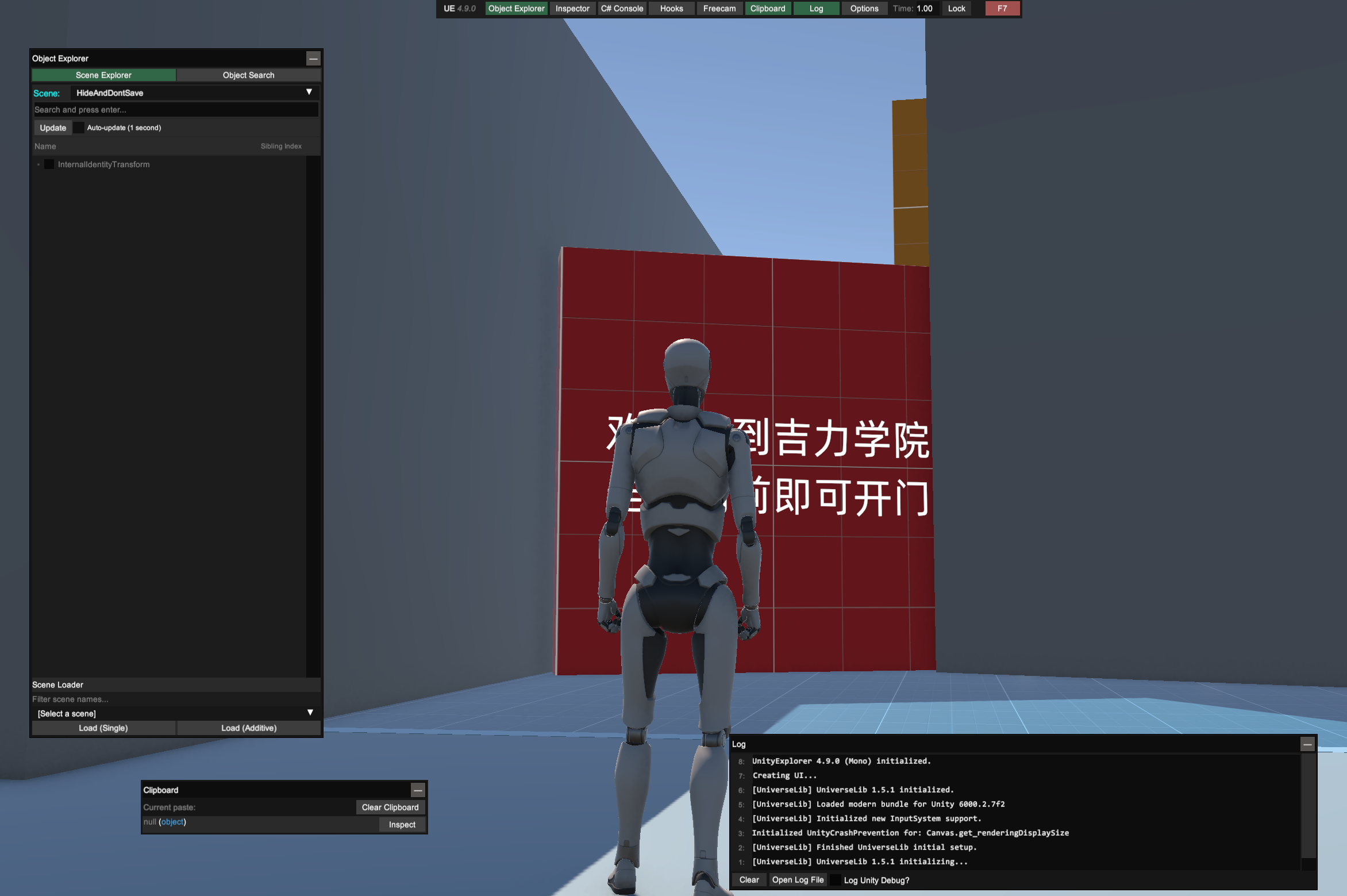
运行游戏,看到视窗
主要功能:Explore Scene和hook和全景相机,功能很强大
android端 以unictf catPWD这道题为例
\lib\arm64-v8a\libil2cpp.so是Unity IL2CPP 把所有 C# 游戏逻辑编译后的 native 动态库
流程跟exe差不多,下载打开Il2CppDumper,运行后依次选择global-metadata.dat , 然后选择libil2cpp.so , 成功的话它会dump出所需文件, 不成功则需要先dump出没加密的global-metadata.dat和libil2cpp.so
打开ida file → script file依次导入dump出来的ida_py3.py,再导入scripts.json, 再导入 ida_py3.py,stringliteral.json 等待恢复符号表完成
https://github.com/Perfare/Zygisk-Il2CppDumper Il2CppDumper 与 Zygisk 配合使用,可在运行时转储 il2cpp 数据,可以绕过保护、加密和混淆。
如果想要运行时hook,可以用frida-il2cpp-bridge,需要学写一些脚本
存几个脚本index.ts
追踪某个类的所有函数
1
2
3
4
5
6
7
8
import "frida-il2cpp-bridge" ;Il2Cpp .perform (() => { console .log ("Unity version: " + Il2Cpp .unityVersion ); const image = Il2Cpp .domain .assembly ("UnityEngine" ).image ; const NetworkKit = image.class ("UnityEngine.Networking.UnityWebRequest" ); Il2Cpp .trace (true ).classes (NetworkKit ).and ().attach (); });
追踪某个方法
1
2
3
4
5
6
7
8
9
10
11
12
13
import "frida-il2cpp-bridge" ;Il2Cpp .perform (() => { console .log ("Unity version: " + Il2Cpp .unityVersion ); const image = Il2Cpp .domain .assembly ("Assembly-CSharp" ).image ; const NetworkKit = image.class ("Assets.Scripts.AndroidKit" ); const SetShield = NetworkKit .method ("SetShield" ); Il2Cpp .trace (true ).methods (SetShield ).and ().attach (); });
运行:frida -U -f com.xxx.xx -l frida.js
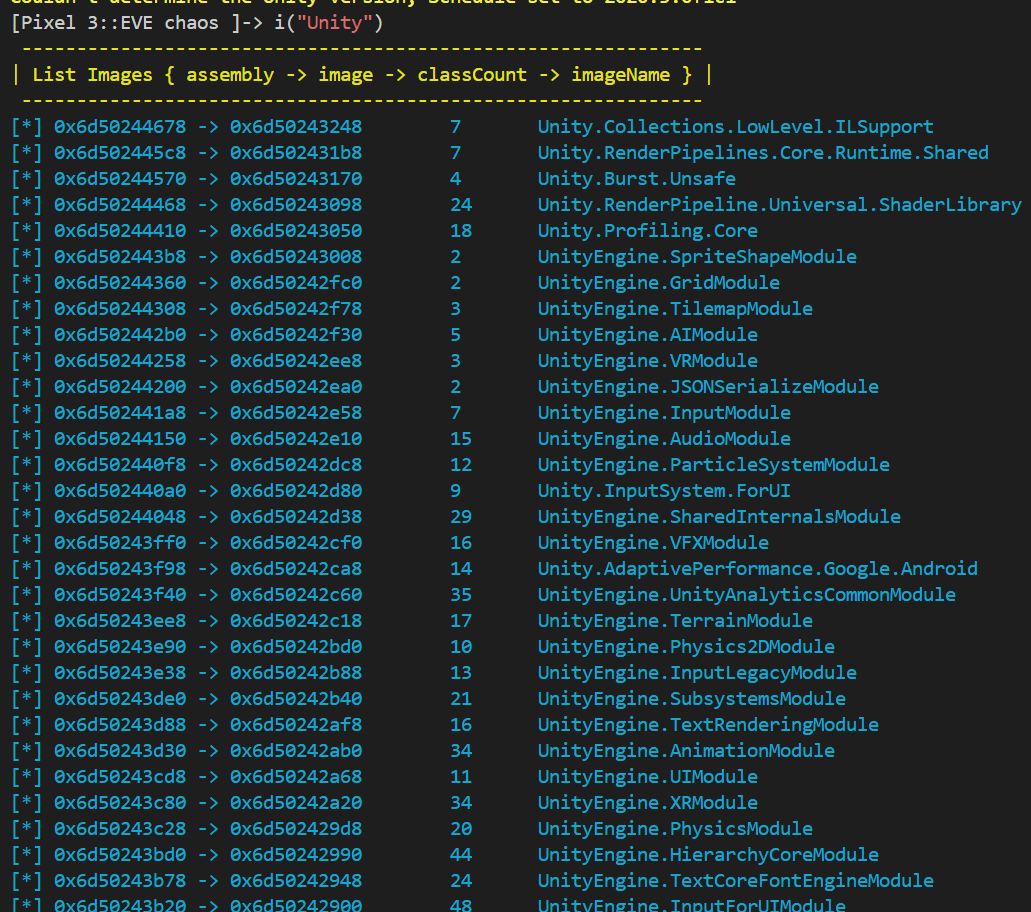
Il2CppHookScripts也是基于 frida 的 libil2cpp.so 运行时解析脚本(https://github.com/axhlzy/Il2CppHookScripts )
1
2
3
4
5
6
install $ npm install il2cpp-hooker -g frida attch current app $ fat frida spawn app of ${PackageName} $ fat ${PackageName}
使用手册:https://github.com/axhlzy/Il2CppHookScripts/wiki/API#